2026-06-08
Postzmaker: a free Canva alternative for social posts

Canva is powerful, but for quickly making a social media post it can feel like a lot: an account, a login, upsells, and features you don't need. If you just want to design a post and download it, Postzmaker is a lighter, free alternative that runs entirely in your browser.
No account, no upload
There's nothing to sign up for. You open the editor and start. Your images are never uploaded to a server — everything is processed on your device, and your drafts stay private in your browser.
What you get for free
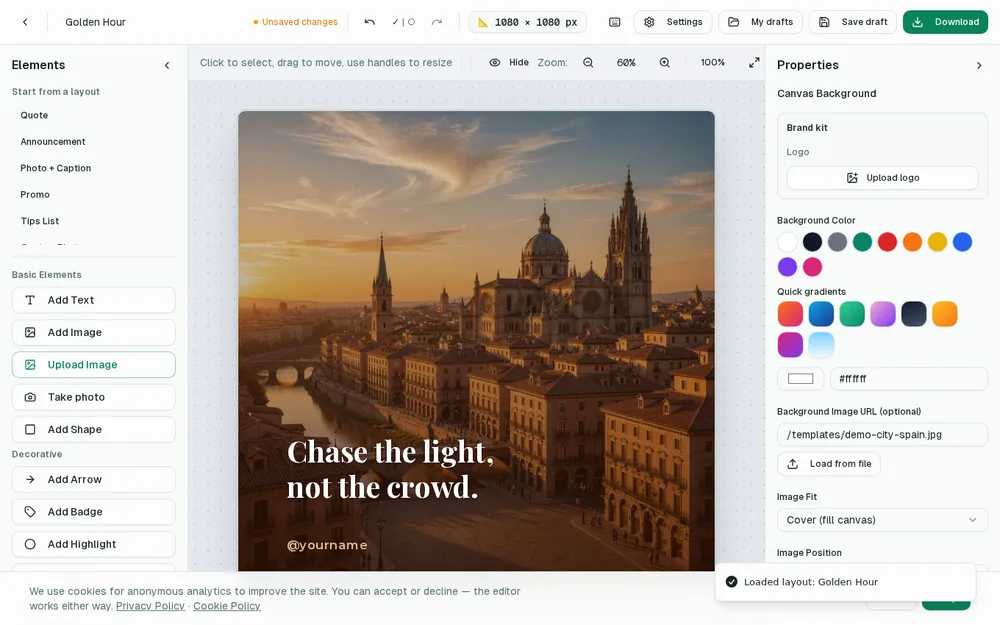
- Ready-made templates and all the common post sizes.
- Upload your photos, add text, shapes, emojis and filters.
- A brand kit to save your logo, colors and fonts.
- Export to PNG, JPG, WebP or PDF — with no watermark.
When Postzmaker is the better fit
If you make posts occasionally, want speed and privacy, and don't need team folders or a huge asset marketplace, a focused free tool wins. You skip the setup and go straight to designing.
When Canva might suit you more
If you need real-time team collaboration, an enormous stock library, video editing or brand management for a whole company, a full platform like Canva makes sense. Use the right tool for the job.
A side-by-side comparison
It helps to see the trade-offs laid out plainly. On the points that matter most for making a single social post, here's how the two approaches differ:
- Account: Postzmaker needs none; Canva asks you to sign up before you can export.
- Price: Postzmaker is free with no watermark; Canva is free for basics but pushes a paid tier for many assets and features.
- Privacy: with Postzmaker your images and drafts stay on your device; with a cloud platform your files live on their servers.
- Speed: opening a browser tab versus loading a full app and project dashboard.
- Offline: Postzmaker keeps working without a connection once loaded; cloud editors generally don't.
- Depth: Canva wins on sheer breadth — stock photos, video, animations, teams — which Postzmaker deliberately leaves out to stay simple.
When a lightweight free tool wins
For a huge number of people — solo creators, shop owners, freelancers, community managers, students — the job is simply “make a nice post and download it.” In that scenario, extra features are friction, not value. A focused tool that opens instantly, requires no login, and hands you a clean PNG is faster and less distracting. There's also the privacy angle: if you'd rather your photos not be uploaded to a company's cloud just to add some text, a browser-only editor is genuinely reassuring. Less software between you and the finished post usually means you actually finish the post.
When Canva makes more sense
This isn't a case for abandoning bigger platforms. If you run a marketing team that needs shared folders and approval flows, if you produce short-form video, if you rely on a massive library of stock imagery and illustrations, or if you manage strict brand assets across many people, a full suite earns its place. The honest framing is that these are different tools for different jobs — a Swiss Army knife versus a good pocket knife. Most individuals reach for the pocket knife far more often than they admit.
Moving a design idea over
Switching is less about migrating files and more about migrating a habit. You don't export a project from one and import it into the other; you simply recreate the idea, which for a social post takes minutes. Pick the same size, drop in the same photo, retype the headline, and save your colors and fonts in the brand kit so the next post is even faster. Because there's nothing to learn and no account to set up, most people are producing finished posts within their first session.
Who Postzmaker is really for
Postzmaker is built for the person who wants to make a good-looking post right now, for free, without signing up or handing over their images — and then get on with their day. If that's you, the lack of a hundred extra panels is the feature, not a limitation. If you need an all-in-one design department, you'll feel the ceiling quickly, and that's fine. Knowing which one you are saves you a lot of wasted clicks.
The quiet cost of “free” accounts
Free plans on big platforms are rarely free of everything. You usually pay in other ways: creating and remembering yet another account, receiving marketing emails, seeing your best templates locked behind a paid tier, and having your files stored on someone else's servers under terms you didn't read. None of that is sinister, but it adds up to friction and a slow drift toward the upgrade button. A tool that asks nothing of you keeps the exchange honest — you open it, you make your post, and you owe it nothing in return.
What you're not giving up
Choosing a lighter tool doesn't mean settling for ugly results. The things that actually make a post look professional — good templates, the right sizes, readable typography, consistent colors, a saved logo, clean export — are all here. What you skip is the overhead, not the quality. For everyday social content, that combination of capable-enough and effortless is usually the sweet spot, and it's why so many people keep a simple editor bookmarked even when they also have a full suite installed. The honest measure of a design tool isn't how many features it has — it's how quickly it gets you to a finished post you're happy to publish. On that measure, a light, free, no-login editor is hard to beat for the everyday jobs that make up the bulk of most people's posting.
Want to try the fast, free route? Open the editor and design a post in minutes — no account required.