
Postzmaker guide
How to Make a WhatsApp Status with Text and a Background
A status is tall, quick and easy to skip. A clear vertical image with a few large words gives your message a chance to land before a thumb moves on. Here is how to build one that works.
How to do it with Postzmaker
- Open an occasion page, such as Good Morning, Happy Friday or Good Night.
- Pick a background with the previous and next arrows.
- Type a title and a message, and add a name only if it helps.
- Choose Status / Story: 1080 by 1920, with a blurred background above and below.
- Check the preview, then tap ‘Download’ to save the JPG.
- Open WhatsApp, go to the Status tab and add the saved image from your gallery.
Why the vertical 9:16 format matters
WhatsApp statuses, Instagram stories and Facebook stories are all designed for a tall phone screen. The standard size is 1080 by 1920 pixels, a 9:16 ratio. A square picture posted there ends up with empty bars or a crop, and neither looks as good as a design made for the space.
In the quick editor on Postzmaker, choosing Status / Story gives you a 1080 by 1920 image. The area above and below the square background is filled with a blurred version of it, so the picture fills the screen without stretching. The result looks intentional rather than patched.
Starting in the right format also saves a lot of guessing. When you can see the final tall layout in the preview, you can decide exactly how long each line is and where each word sits, instead of hoping the app frames your square image kindly.
If you want a different layout altogether, the full editor also offers a blank Story canvas of the same size, where you can place text, shapes and your own photos.
The safe zone: where text survives
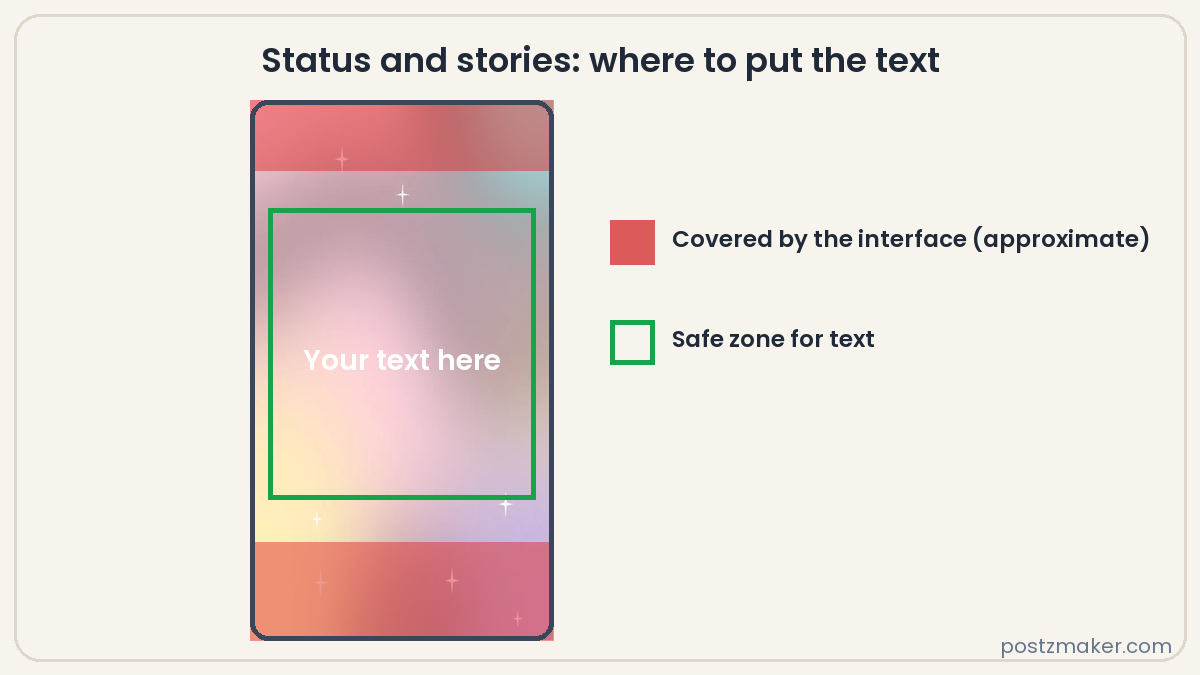
The top of a status carries the progress bar and your name; the bottom carries the reply field or the buttons for viewers. Anything you place there may be hidden, partly covered or crowded by interface elements. This is why the best statuses keep their words in the middle part of the frame.
A practical rule is to leave about the top 12 percent and the bottom 15 percent of the height empty of important text. On a 1920-pixel image that is roughly 230 pixels at the top and 290 at the bottom. These figures are only a guide, because apps change their interface from time to time, so treat them as a cautious margin rather than an exact rule.
Keep side margins too, around 80 to 100 pixels on each side, so that letters do not touch the edge on phones with rounded corners. A line that is cut at the edge is worse than a shorter line that sits comfortably.
To test, post the status, open it from My status as a viewer would, and delete it if anything is clipped. Thirty seconds will show you whether your margin is enough.
Make the words readable in two seconds
People watch statuses in a row, usually with a thumb ready to tap forward. You have about two seconds. That is time for a title of two to four words and a message of perhaps eight to twelve. If the message needs more, split it across two or three statuses.
Contrast does most of the work. Dark letters on a light background or white letters on a dark one will always beat mid-tone on mid-tone. On the Night styles, such as Moon and Starry sky, white or cream letters feel natural. On Minimal or Watercolor, use deep gray or navy rather than pure black for a softer look.
Size matters as much as color. Letters that look fine on your computer preview can shrink to nothing on a phone held at arm’s length, in sunshine. As a rule of thumb, the main message should be at least as big as a headline. If you hesitate between two sizes, choose the bigger one.
Avoid thin or very decorative scripts for whole sentences. Keep them for a single word or a name, and use a clean sans-serif for the message.
Choose a background that supports the message
The background tells people what kind of status this is before they read a word. A Sunrise or Coffee background says ‘morning’. Moon, Starry sky and Cozy say ‘good night’. Neon, Cheers and Retro say ‘Friday is here’. Confetti, Balloons and Cake say ‘it is someone’s birthday’.
Because statuses are watched quickly, calmer backgrounds work better than crowded ones. Gradient, Minimal and Watercolor leave plenty of quiet space for words. Busy styles are fine for a single big word, but a whole sentence on top of them becomes harder to read.
Think about your audience, too. The people who see your WhatsApp status are mostly friends, family and colleagues, so what is charming to a cousin may be odd to a client. If you share the status with a mixed audience, calm and warm beats loud.
How long a status lasts and when to post
A WhatsApp status stays visible for twenty-four hours, and Instagram and Facebook stories usually do the same. During that time, contacts can look at it more than once, so a message that reads well on the second view is a good sign.
Post when people look at their phones: the morning before work, around lunch, or in the early evening. A good night image works best in the late evening, shortly before people go to bed. Avoid uploading a long chain of images at once, since viewers tend to skip through them; two or three well-chosen ones get more attention than eight.
Think about the order, too. The first image is the one most people will see, so put the main message first and the less important one after. If you are posting a series, such as a Monday-to-Sunday set, one a day is plenty.
Finally, check who can see it. WhatsApp lets you choose which contacts see your status in its privacy settings. Before posting something personal, look there so the right people, and only they, get to see it.
From the quick editor to your status
On a phone, ‘Send on WhatsApp’ opens the share sheet with the file ready. If the share sheet offers WhatsApp’s status option, you can post straight from there; if not, use ‘Download’ and add the image from the Status tab.
On a computer, the image downloads to your device. Move it to your phone or open it from your gallery, then tap the add-status button in the Status tab (a camera or plus icon, depending on your version). Instagram and Facebook stories work the same way: save the image, then choose it from your gallery when you create the story.
If you want to change more than the message and name, use ‘Open in the full editor’. Your title, message and name carry over, and you can move the text, change the typeface, adjust the background or add your own picture before downloading.
Ideas for statuses that people want to watch
Not every status has to be a greeting. A weekly ritual works well: a short message for Monday motivation, a funny line on Friday, a calm picture on Sunday evening. Because the format is the same each time, people recognize your statuses and look forward to them.
Other good uses include announcing something small and happy, such as a birthday, a new baby, an exam passed or a trip; sharing a line you wanted to say but did not know how; and saying thank you to a group of people at once. A thank-you status with a warm background is a gentle way to say it to everyone.
Leave room for your own voice. A status in which you write one line about your actual day is more interesting than a perfect quote. People notice what is real.
Statuses are also a handy place to test a design. If a message gets several replies, it probably works; you can reuse the same background and tone for a card or a message later. If nobody reacts, shorten the text and try again tomorrow.
Examples: status texts that fit the screen
- Monday: Small steps still count.
- Good morning. Coffee first, plans later.
- Friday at last. Close the laptop, open the day.
- Sunday: Nowhere to be. Nothing to prove.
- Good night. Today was enough.
- Thank you to everyone who made my week easier.
- Happy birthday to me. Cake accepted in all forms.
- Beach day. Do not call.
- New week, new page. Write something kind.
Try it now
 ☀️ Good morning images to personalize and send54 images
 🌙 Good night images to personalize and send42 images
 🌇 Good evening images to personalize and send42 images
 🥂 Happy Friday images to send before the weekend42 images
 🎉 Happy weekend images to send to everyone42 images
 🎂 Happy birthday images to personalize and send60 images
Frequently asked questions
What size should a WhatsApp status image be?
The standard size is 1080 by 1920 pixels, a vertical 9:16 ratio. It is the same size used for Instagram and Facebook stories. In the quick editor, choose Status to get that size; the area above and below the image is filled with a blurred version of the background so the picture fills the screen.
Why is part of my text hidden in my status?
The top and bottom of a status are covered by the progress bar, your name and the reply field. If your words sit in those bands, they can be hidden. Move the text toward the middle of the frame and leave a generous margin above and below, then post it and view it from My status to check.
How long does a WhatsApp status stay visible?
A WhatsApp status stays visible for twenty-four hours, and stories on Instagram and Facebook work in much the same way. If you post several images, remember that viewers tend to skip through long chains.
Can I post the same image as a status and a story?
Yes. A 1080 by 1920 image works as a WhatsApp status, an Instagram story and a Facebook story. Download the image once and add it from your gallery in each app. Just check that your text stays in the safe zone, because each app places its own buttons slightly differently.
Why does my status look blurry?
WhatsApp compresses images, statuses included, so thin or tiny letters suffer first. Use large, simple letters with strong contrast. Upload the downloaded 1080 by 1920 file itself rather than a screenshot of it, since every extra copy loses a little detail. A screenshot of a screenshot is the fastest way to a fuzzy status.
Do I need an account to make a status image?
No. Postzmaker works in the browser on a phone or a computer, and you do not need to register. By default the image carries a small ‘postzmaker.com’ line at the bottom right; untick ‘Show postzmaker.com at the bottom’ to remove it. The image is free for personal posts and your social profiles.
More guides
- How to Make Good Morning Images for WhatsApp
- How to Make a Greeting Card Online for Free
- How to Choose the Right Background, Colors and Font
- How to Write Original Greeting Messages That Sound Like You
- How to Prepare a Different Image for Each Day of the Week
- Birthday messages for every person on your list
- Christmas and New Year wishes: what to write, to whom and when
- Valentine’s Day messages that are not clichés
- Mother’s Day and Father’s Day: dates, messages and ideas
- Why WhatsApp images look blurry, and how to send them sharper
- Workplace greetings: coworkers, clients and your boss
- How to Make Images Everyone Can Read
- Plan Your Year of Greeting Posts, Month by Month
- What to Write for Weddings, New Babies and Graduations
- Writing to Someone Who Is Unwell or Going Through a Hard Time
- How Holidays Differ Between Italy, Spain and English-Speaking Countries
- The Full Editor, Step by Step